
Admin Ban Wiring + Manual Ban View - Manual Test Plan
| Field | Value |
|---|---|
| Branch / PR | claude/sealed-identity-stage-b (working tree on ac25e601, ban-wiring changes uncommitted at time of writing) |
| Environment | local dev: admin :3001 -> auth-api :8084, hits LIVE lantern-app-dev Firebase |
| Build flags / config | n/a (no feature flag gates the admin ban UI) |
| Build (commit) | __________ (fill with git rev-parse --short HEAD at test time) |
| Tester | Mechelle |
| Date | 2026-06-28 (follow-up log added 2026-07-13) |
Summary
| # | Scenario | Result | Notes |
|---|---|---|---|
| 1 | Moderation page: Cases | Manual ban tab switch | [x] pass | no issues |
| 2 | Manual ban - Phone mode UI + confirm modal (cancel) | [x] pass | defaults to Phone; cancel writes nothing |
| 3 | Manual ban - User ID mode swaps label/hint | [x] pass | label/hint/input swap correct |
| 4 | Manual ban - client validation (empty fields) | [ ] pass [ ] fail [x] blocked | submit correctly disabled, but NO required-field error messages surface (UI follow-up) |
| 5 | Manual ban - non-existent UID -> error banner (no write) | [x] pass | 404 NOT_FOUND banner, no write. UI nits: Review-ban button shifts on error; drop the divider above the CTA |
| 6 | Manual ban - guardrail errors (self / admin) | [x] pass | 422 SELF_BAN then CANNOT_BAN_ADMIN; no writes |
| 7 | LIVE: Manual ban by phone -> blocks re-registration | [x] pass (partial) | ban works; success banner vanishes after a few seconds (should persist until navigation) |
| 8 | LIVE: Manual ban by userId -> disables login | [x] pass (partial) | login blocked, but the message reads "incorrect pin" instead of "user disabled"; banned user shows on the Users page |
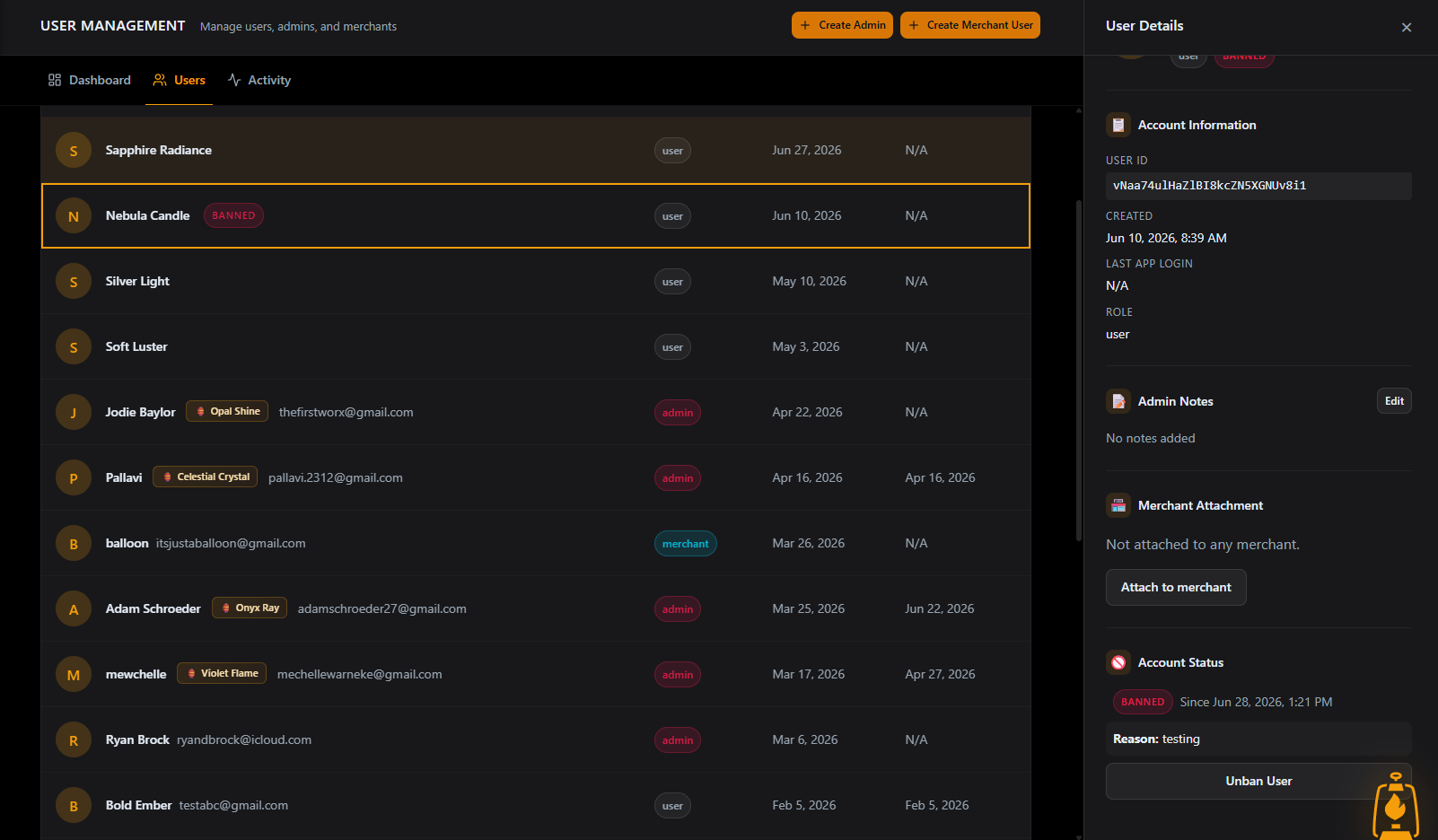
| 9 | LIVE: Ban a SEALED account (privacy invariant) | [x] pass (confirmed 2026-07-13) [ ] fail [ ] blocked | initially blocked (test-data confusion); privacy invariant CONFIRMED in the 2026-07-01 sealed-ban run - see the §9 follow-up log |
| 10 | LIVE: Users-page Ban repoint (the bug fix) | [x] pass | routes through the Express moderation API + writes banned_accounts |
| 11 | LIVE: Users-page Unban -> restores both axes | [x] pass | unban restores login + overturns the number ban |
Setup / preconditions
- Services running:
- auth-api: from
services/api/auth/, runnpm run dev(listens on:8084). - admin: from repo root,
npm run dev -w apps/admin(serves:3001). VITE_AUTH_API_URLin root.env.localmust point at the auth-api (e.g.http://localhost:8084). App Check works the same way it does for the existing admin API calls (Users page, Merchants), so if those load, moderation calls will too.
- auth-api: from
- Sign in to the admin portal at
http://localhost:3001as an admin. - Test accounts / numbers (guardrail):
- Phone bans: use a Prelude test number only (do not use a real subscriber number until approved).
- userId bans: use a throwaway dev app-user you can afford to disable, NOT your own admin and NOT another admin.
- For the sealed-account case you need a sealed app-user (a
users/{uid}doc with NOphoneHash/phonefield;auth_lookup/{hash}.encryptedUserIdBlobpresent).
- Where to verify data (Firebase console, project
lantern-app-dev):banned_accounts/{banId}-phoneHash,emailHash,severity,expiresAt,bannedBy,evidence,appealStatus.users/{uid}-banned,bannedAt,bannedBy,banRecordIds.adminActions- newest doc:action,targetUserId/banId,performedBy,performedAt.- Auth tab - the user's Disabled flag.
- Browser DevTools Network tab - the
POST /auth/moderation/*request status + JSON body.
- Reaching a clean state: after a LIVE ban, unban the same account (Scenario 11 covers the userId axis; for a phone ban, overturn it via the API or Firestore so the number can register again).
Scenarios
1. Moderation page: Cases | Manual ban tab switch
- Goal: the new top-level PageTabs switch works and does not disturb the Cases prototype.
- Preconditions: signed in as admin.
- Steps:
- Navigate to
Moderationin the left nav (/admin/moderation). - Confirm the page opens on the Cases tab (amber underline) with the mock case list, metric cards, and the "Prototype with mock data" banner.
- Click the Manual ban tab.
- Click back to Cases.
- Navigate to
- Expected: the tab switch toggles between the two views; Cases shows the mock list + drawer behavior unchanged; switching to Manual ban hides the case list and the case drawer.
- Verify (data/console): no console errors on switch; no network calls fire just from switching tabs.
Result:    [ X ] pass   [ ] fail   [ ] blocked
Actual:    No Issues Found.
Evidence:  See console log below.
Follow-up: ______________________________________________Navigated to http://localhost:3001/admin/moderation
firebase.js:97 App Check initialized successfully
installHook.js:1 ⚠️ React Router Future Flag Warning: React Router will begin wrapping state updates in `React.startTransition` in v7. You can use the `v7_startTransition` future flag to opt-in early. For more information, see https://reactrouter.com/v6/upgrading/future#v7_starttransition.
overrideMethod @ installHook.js:1
warnOnce @ react-router-dom.js?v=03be85c5:3614
logDeprecation @ react-router-dom.js?v=03be85c5:3617
logV6DeprecationWarnings @ react-router-dom.js?v=03be85c5:3619
(anonymous) @ react-router-dom.js?v=03be85c5:4411
react_stack_bottom_frame @ react-dom_client.js?v=03be85c5:12904
runWithFiberInDEV @ react-dom_client.js?v=03be85c5:851
commitHookEffectListMount @ react-dom_client.js?v=03be85c5:6617
commitHookPassiveMountEffects @ react-dom_client.js?v=03be85c5:6652
commitPassiveMountOnFiber @ react-dom_client.js?v=03be85c5:7618
recursivelyTraversePassiveMountEffects @ react-dom_client.js?v=03be85c5:7606
commitPassiveMountOnFiber @ react-dom_client.js?v=03be85c5:7617
recursivelyTraversePassiveMountEffects @ react-dom_client.js?v=03be85c5:7606
commitPassiveMountOnFiber @ react-dom_client.js?v=03be85c5:7672
recursivelyTraversePassiveMountEffects @ react-dom_client.js?v=03be85c5:7606
commitPassiveMountOnFiber @ react-dom_client.js?v=03be85c5:7627
flushPassiveEffects @ react-dom_client.js?v=03be85c5:8808
(anonymous) @ react-dom_client.js?v=03be85c5:8562
performWorkUntilDeadline @ react-dom_client.js?v=03be85c5:36
<BrowserRouter>
exports.jsxDEV @ react_jsx-dev-runtime.js?v=03be85c5:193
(anonymous) @ App.jsx:365
react_stack_bottom_frame @ react-dom_client.js?v=03be85c5:12868
renderWithHooksAgain @ react-dom_client.js?v=03be85c5:4268
renderWithHooks @ react-dom_client.js?v=03be85c5:4219
updateFunctionComponent @ react-dom_client.js?v=03be85c5:5569
beginWork @ react-dom_client.js?v=03be85c5:6140
runWithFiberInDEV @ react-dom_client.js?v=03be85c5:851
performUnitOfWork @ react-dom_client.js?v=03be85c5:8429
workLoopSync @ react-dom_client.js?v=03be85c5:8325
renderRootSync @ react-dom_client.js?v=03be85c5:8309
performWorkOnRoot @ react-dom_client.js?v=03be85c5:7957
performWorkOnRootViaSchedulerTask @ react-dom_client.js?v=03be85c5:9059
performWorkUntilDeadline @ react-dom_client.js?v=03be85c5:36
<App>
exports.jsxDEV @ react_jsx-dev-runtime.js?v=03be85c5:193
(anonymous) @ main.jsx:41
installHook.js:1 ⚠️ React Router Future Flag Warning: Relative route resolution within Splat routes is changing in v7. You can use the `v7_relativeSplatPath` future flag to opt-in early. For more information, see https://reactrouter.com/v6/upgrading/future#v7_relativesplatpath.
overrideMethod @ installHook.js:1
warnOnce @ react-router-dom.js?v=03be85c5:3614
logDeprecation @ react-router-dom.js?v=03be85c5:3617
logV6DeprecationWarnings @ react-router-dom.js?v=03be85c5:3620
(anonymous) @ react-router-dom.js?v=03be85c5:4411
react_stack_bottom_frame @ react-dom_client.js?v=03be85c5:12904
runWithFiberInDEV @ react-dom_client.js?v=03be85c5:851
commitHookEffectListMount @ react-dom_client.js?v=03be85c5:6617
commitHookPassiveMountEffects @ react-dom_client.js?v=03be85c5:6652
commitPassiveMountOnFiber @ react-dom_client.js?v=03be85c5:7618
recursivelyTraversePassiveMountEffects @ react-dom_client.js?v=03be85c5:7606
commitPassiveMountOnFiber @ react-dom_client.js?v=03be85c5:7617
recursivelyTraversePassiveMountEffects @ react-dom_client.js?v=03be85c5:7606
commitPassiveMountOnFiber @ react-dom_client.js?v=03be85c5:7672
recursivelyTraversePassiveMountEffects @ react-dom_client.js?v=03be85c5:7606
commitPassiveMountOnFiber @ react-dom_client.js?v=03be85c5:7627
flushPassiveEffects @ react-dom_client.js?v=03be85c5:8808
(anonymous) @ react-dom_client.js?v=03be85c5:8562
performWorkUntilDeadline @ react-dom_client.js?v=03be85c5:36
<BrowserRouter>
exports.jsxDEV @ react_jsx-dev-runtime.js?v=03be85c5:193
(anonymous) @ App.jsx:365
react_stack_bottom_frame @ react-dom_client.js?v=03be85c5:12868
renderWithHooksAgain @ react-dom_client.js?v=03be85c5:4268
renderWithHooks @ react-dom_client.js?v=03be85c5:4219
updateFunctionComponent @ react-dom_client.js?v=03be85c5:5569
beginWork @ react-dom_client.js?v=03be85c5:6140
runWithFiberInDEV @ react-dom_client.js?v=03be85c5:851
performUnitOfWork @ react-dom_client.js?v=03be85c5:8429
workLoopSync @ react-dom_client.js?v=03be85c5:8325
renderRootSync @ react-dom_client.js?v=03be85c5:8309
performWorkOnRoot @ react-dom_client.js?v=03be85c5:7957
performWorkOnRootViaSchedulerTask @ react-dom_client.js?v=03be85c5:9059
performWorkUntilDeadline @ react-dom_client.js?v=03be85c5:36
<App>
exports.jsxDEV @ react_jsx-dev-runtime.js?v=03be85c5:193
(anonymous) @ main.jsx:41
firebase_app-check.js?v=03be85c5:1104 App Check debug token: fe53aa9a-a743-4e3d-b97e-1f784074c409. You will need to add it to your app's App Check settings in the Firebase console for it to work.
AdminMigrationBanner.jsx:41 🔐 CorruptedEncryptionAlert: Checking user aR7ivxIk48Wijw1nXBs8C9KyfhB2 trigger: null
installHook.js:1 🔐 CorruptedEncryptionAlert: Checking user aR7ivxIk48Wijw1nXBs8C9KyfhB2 trigger: null
AdminMigrationBanner.jsx:45 🔐 CorruptedEncryptionAlert: userData {exists: true, salt: true, encryptionCorrupted: false, encryptionReinitialized: true, lanternName: 'Celestial Glow'}
AdminMigrationBanner.jsx:64 🔐 CorruptedEncryptionAlert: Already reinitialized
AdminMigrationBanner.jsx:45 🔐 CorruptedEncryptionAlert: userData {exists: true, salt: true, encryptionCorrupted: false, encryptionReinitialized: true, lanternName: 'Celestial Glow'}
AdminMigrationBanner.jsx:64 🔐 CorruptedEncryptionAlert: Already reinitialized2. Manual ban - Phone mode UI + confirm modal (cancel)
- Goal: the phone-mode form renders on-brand and the confirm modal summarizes correctly, with no write on cancel.
- Preconditions: on Moderation -> Manual ban.
- Steps:
- Confirm Ban by defaults to Phone number (amber selected) and the field label reads "Phone number".
- Read the hint under the field: it should say it blocks re-registration and does not disable a logged-in account.
- Enter a Prelude test number, a reason, and leave Duration on Permanent.
- Click Review ban.
- In the confirm modal, read the summary; click Cancel.
- Expected: confirm modal shows "Phone:
<number>", "Duration: Permanent", "Reason:<text>", plus the amber "acts on a live account immediately" warning. Cancel closes the modal and returns to the filled form. No success banner. - Verify (data/console): Network tab shows NO
POST /auth/moderation/*request (cancel does not call the API).
Result:    [ X ] pass   [ ] fail   [ ] blocked
Actual:    Defaults to phone
Evidence:  ______________________________________________  (screenshot / console line / doc id)
Follow-up: ______________________________________________3. Manual ban - User ID mode swaps label/hint
- Goal: switching to User ID mode re-labels the field and updates the hint + input type.
- Preconditions: on Manual ban.
- Steps:
- Click the User ID segment of the Ban by toggle.
- Observe the field label, placeholder, and hint.
- Expected: label becomes "User ID", placeholder "Firebase Auth UID", and the hint now reads that it disables login, ends active sessions, and blocks re-registration when a number is on file. The amber selection moves to User ID.
- Verify (data/console): no console errors.
Result:    [ X ] pass   [ ] fail   [ ] blocked
Actual:    Swaps label/hint correctly
Evidence:  ______________________________________________  (screenshot / console line / doc id)
Follow-up: ______________________________________________4. Manual ban - client validation (empty fields)
- Goal: the form cannot be submitted without an identifier and a reason.
- Preconditions: on Manual ban, fields empty.
- Steps:
- With both identifier and reason empty, observe the Review ban button.
- Type an identifier only (no reason); observe the button.
- Clear the identifier, type a reason only; observe the button.
- Expected: Review ban is disabled until BOTH the identifier and the reason are non-empty. No confirm modal opens while disabled. (If a path reaches review with an empty field, an inline error appears instead.)
- Verify (data/console): no network call while fields are incomplete.
Result:    [ ] pass   [ ] fail   [ X ] blocked
Actual:    For both instances, it correctly did not submit. However, there weren't any error messages that showed up to indicate that the fields were required. This may be a UI issue that needs to be addressed.
Evidence:  ______________________________________________  (screenshot / console line / doc id)
Follow-up: ______________________________________________5. Manual ban - non-existent UID -> error banner (no write)
- Goal: a bad UID surfaces the server error cleanly and writes nothing.
- Preconditions: on Manual ban, User ID mode.
- Steps:
- Enter a clearly fake UID (e.g.
uid_does_not_exist_123), a reason, Permanent. - Click Review ban, then Confirm ban.
- Enter a clearly fake UID (e.g.
- Expected: a red error banner appears reading "User not found" (the server rejects before any write). No success banner.
- Verify (data/console): Network tab shows
POST /auth/moderation/ban-> 404{ error: "NOT_FOUND" }. NO newbanned_accountsdoc and NO newadminActionsdoc for this attempt.
Result:    [ X ] pass   [ ] fail   [ ] blocked
Actual:    Error banner appears as expected; no writes occurred.
Evidence:  See screenshot below
Follow-up: The "review ban" button gets shifted down when the error banner appears. A bit of an odd UI quirk, but not a functional issue. We should also remove that divider above the ban CTA, it isn't necessary and makes the UI look a bit odd.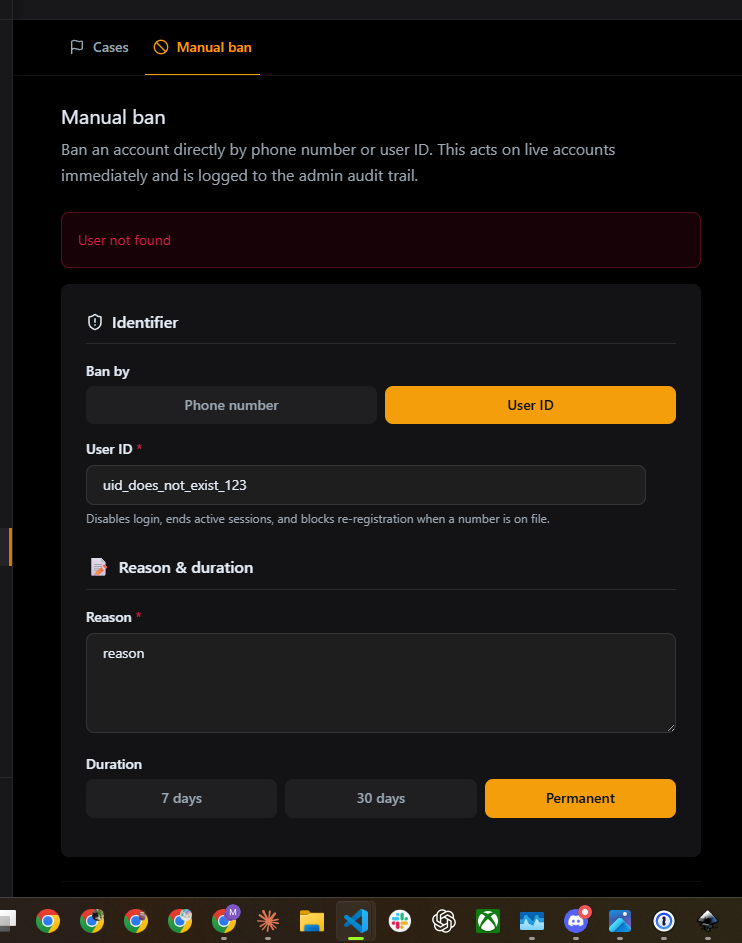
6. Manual ban - guardrail errors (self / admin)
- Goal: the backend refuses self-bans and admin-bans, and the UI shows the message.
- Preconditions: on Manual ban, User ID mode. Have your own admin UID and a second admin UID handy.
- Steps:
- Enter YOUR OWN admin UID + a reason; Review ban -> Confirm ban.
- Then enter a DIFFERENT admin's UID + a reason; Review ban -> Confirm ban.
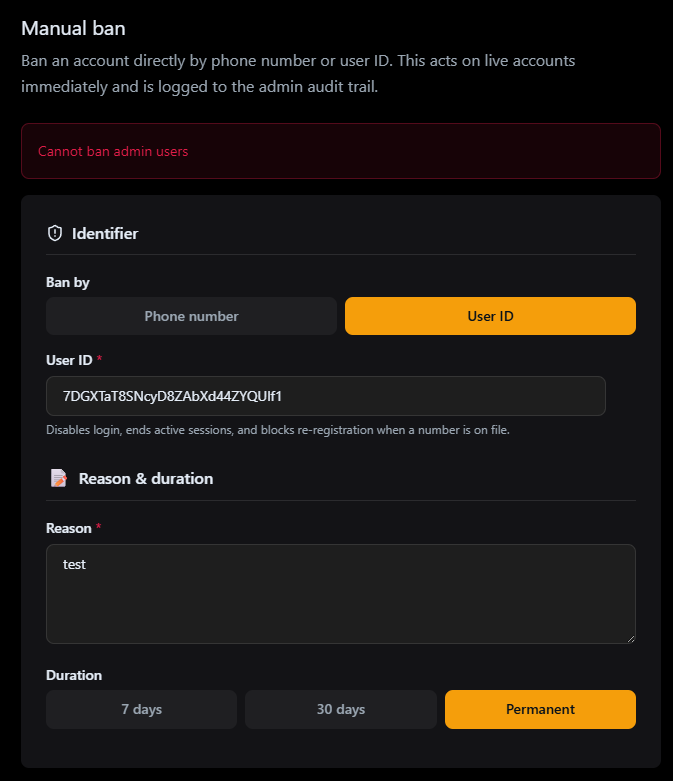
- Expected: step 1 shows a red banner "Cannot ban yourself"; step 2 shows "Cannot ban admin users". No account is disabled in either case.
- Verify (data/console): Network shows 422
SELF_BANthen 422CANNOT_BAN_ADMIN. Auth tab: neither admin's Disabled flag changes.
Result:    [ X ] pass   [ ] fail   [ ] blocked
Actual:    Error banners appear as expected; no writes occurred.
Evidence:  See screenshots below
Follow-up: ______________________________________________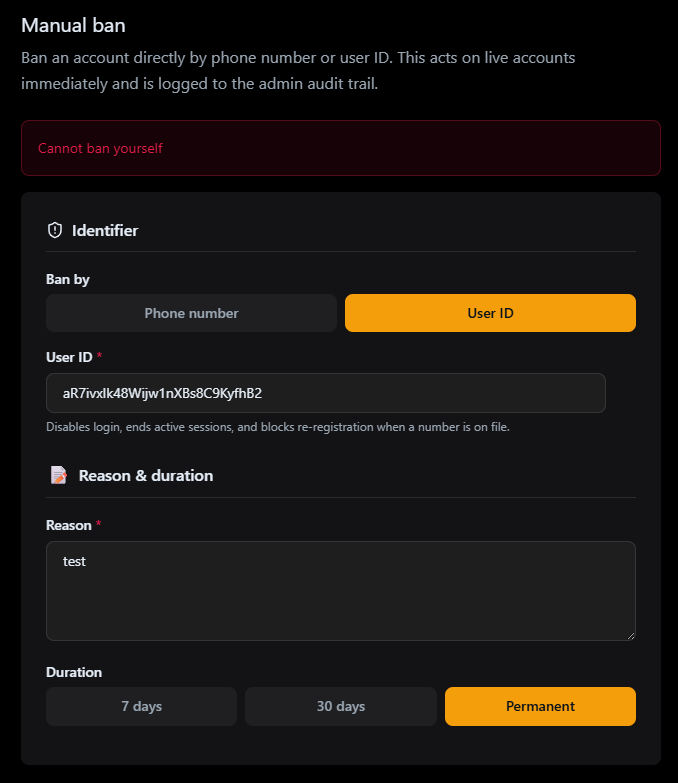
7. LIVE: Manual ban by phone -> blocks re-registration
LIVE write. Uses a Prelude test number only. Creates a real
banned_accountsrow. Clean up by overturning the ban afterward.
- Goal: banning a number writes a peppered phoneHash ban and stops that number from registering.
- Preconditions: Manual ban, Phone mode. Pick a Prelude test number that is NOT currently tied to a live account.
- Steps:
- Enter the Prelude test number, a reason, Duration Permanent.
- Review ban -> Confirm ban.
- Note the success banner.
- In a separate flow, attempt to sign up / request an OTP with that same number.
- Expected: green success banner "Phone ban created". The subsequent signup/OTP attempt on that number is refused at the ban gate (403 BANNED).
- Verify (data/console): Network:
POST /auth/moderation/ban-phone-> 200{ banId, message: "Phone ban created" }. Firestorebanned_accounts/{banId}:phoneHashset (v1:...),emailHashnull,severity: "permanent",expiresAtnull,evidenceNOT containing any userId.adminActionsnewest:action: "banPhone".
Result:    [ X ] pass ( partial )   [ ] fail   [ ] blocked
Actual:    The banned banner did show, but it disappeared after a few seconds. The ban was still in effect, but the banner should remain until the user navigates away from the page.
Evidence:  Couldn't capture the screenshot fast enough and but the activity did show up in the network. Nothing in the console log.
Follow-up: ______________________________________________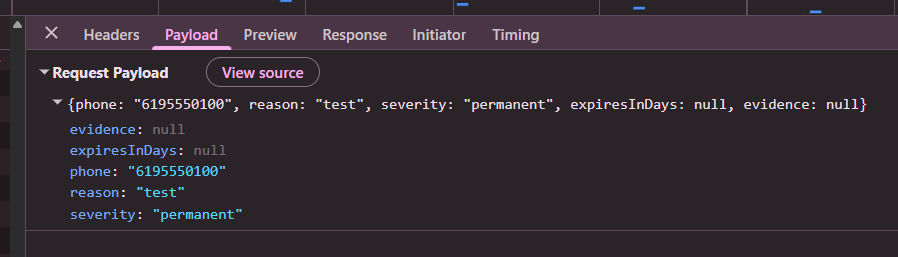
8. LIVE: Manual ban by userId -> disables login
LIVE write. Uses a throwaway dev app-user. Disables that account + revokes its sessions. Clean up via Scenario 11 (or unban from the Users page).
- Goal: banning a userId disables Auth login, kills sessions, and (when a number is on file) blocks re-registration.
- Preconditions: Manual ban, User ID mode. Have a throwaway app-user's UID, ideally logged in on a second device/browser so you can watch the session drop.
- Steps:
- Enter the throwaway user's UID, a reason, Permanent.
- Review ban -> Confirm ban; note the success banner.
- On the second device where that user was logged in, try to act / refresh.
- Try to log in fresh as that user.
- Expected: green "User banned permanently". The user's active session can no longer perform authenticated actions; a fresh login is rejected (
auth/user-disabled). - Verify (data/console): Network:
POST /auth/moderation/ban-> 200. Auth tab: user Disabled = true. Firestoreusers/{uid}:banned: true,bannedAt,bannedBy= your admin UID,banRecordIdspresent (if a number was on file).banned_accounts/{banId}: created withphoneHash(if number on file).adminActionsnewest:action: "banUser".
Result:    [ X ] pass ( partial )   [ ] fail   [ ] blocked
Actual:    When trying to signin again, I was correctly blocked. However the message says "incorrect pin" instead of "user disabled". Side note success, I do see the banned user in the admin users page, this likely still needs to be wired up in the moderation page.
Evidence:  See screenshot below.
Follow-up: Wondering in this scenario if we add in an option to reach out to support if the user believes this was a mistake.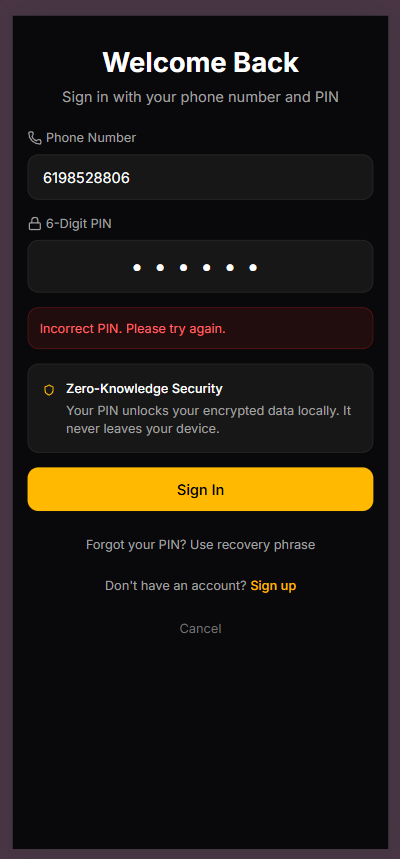
admin > users successufilly shows the banned user with the disabled flag set to true
9. LIVE: Ban a SEALED account (privacy invariant)
LIVE write. Uses a sealed throwaway app-user. This guards the Stage B section 14.6 invariant: no record may co-locate a phone (or phoneHash) with a userId.
- Goal: a sealed account (no phone/phoneHash on its doc) can be login-banned WITHOUT creating any phone<->userId link.
- Preconditions: a sealed
users/{uid}(nophoneHash/phone); you know its UID. - Steps:
- Manual ban, User ID mode: enter the sealed user's UID, a reason, Permanent.
- Review ban -> Confirm ban.
- Expected: green success; the sealed user's login is disabled.
- Verify (data/console):
- Auth tab: Disabled = true; Firestore
users/{uid}.banned: true. - No number-ban leakage: there is NO
banned_accountsrow that pairs this user's number/phoneHash with the userId. If abanned_accountsrow was written at all, itsevidenceis exactlysource:moderation-ban(no plaintext userId), and it does NOT also carry a phoneHash that the sealed doc lacked. For a fully sealed account with no derivable number, expect NObanned_accountsrow from this action. adminActionsnewest:action: "banUser",targetUserId= the UID (audit log is allowed to reference the userId; the privacy invariant is specifically aboutbanned_accounts).
- Auth tab: Disabled = true; Firestore
Result:    [ ] pass   [ ] fail   [ X ] blocked
Actual:    I was going to unban the number that has a sealed account but I ended up seeing two "Nebula Candle" accounts. Now I am not sure if this is related to the ban I did on the user id or the phone. The phone number ban was done with a prelude test number ( which should also be a sealed account ).
Evidence:  See screenshot below.
Follow-up:
Follow-up log (2026-07-13, sealed-ban reconciliation run): the sealed-account userId ban + the Stage B section 14.6 privacy invariant are now CONFIRMED (this scenario was blocked here by a test-data mix-up, not a ban bug). In the 2026-07-01 sealed-ban run, a sealed account (userId 1af5b6a2...) was banned by userId via the admin portal and ban-doctor verified the invariant held: users/{uid}.banned=true + Auth disabled=true, but banRecordIds=[] (NO phone<->userId link), and the phone-side block materialized ONLY as a hash-only login-harvest banned_accounts row (evidence: source:login-harvest, no userId). So a sealed userId ban never co-locates a phone/phoneHash with a userId. Reinstate was also confirmed end-to-end: admin /unban plus the new Option B login-harvest self-clear now fully reinstates a sealed account (previously a deadlock at /lookup). The earlier "two Nebula Candle accounts" was a duplicate-test-account artifact, not a ban side effect.
10. LIVE: Users-page Ban repoint (the bug fix)
LIVE write. This is the core fix: the Users-page Ban now routes through the Express moderation API, which (unlike the old Cloud Function) writes a
banned_accountsrecord so the account cannot re-register.
- Goal: banning from the Users table disables login AND blocks re-registration.
- Preconditions: a throwaway, non-sealed app-user that HAS a number on file; find them in the Users list.
- Steps:
- Go to
Users, open the throwaway user's detail panel. - Click Ban, enter a reason, choose a duration, confirm.
- Note the success message.
- Attempt to re-register / request an OTP with that user's number.
- Go to
- Expected: ban succeeds; the user cannot log in; re-registration with their number is refused at the gate (this is the behavior the legacy Cloud Function did NOT provide).
- Verify (data/console): Network:
POST /auth/moderation/ban-> 200 (NOT a Cloud Function call). Auth tab: Disabled = true. Firestore:users/{uid}.banned: trueAND a NEWbanned_accounts/{banId}with the user'sphoneHash.adminActions:action: "banUser".
Result:    [ X ] pass   [ ] fail   [ ] blocked
Actual:    Seemed to have banned correctly ( account was Soft Luster / I believe it isn't a sealed account or was at least created before the sealed account integration )
Evidence:  see screenshot below
Follow-up: Side note, after the ban, it removed my search filter and I had to search for the user again. Not sure if this is expected behavior or not.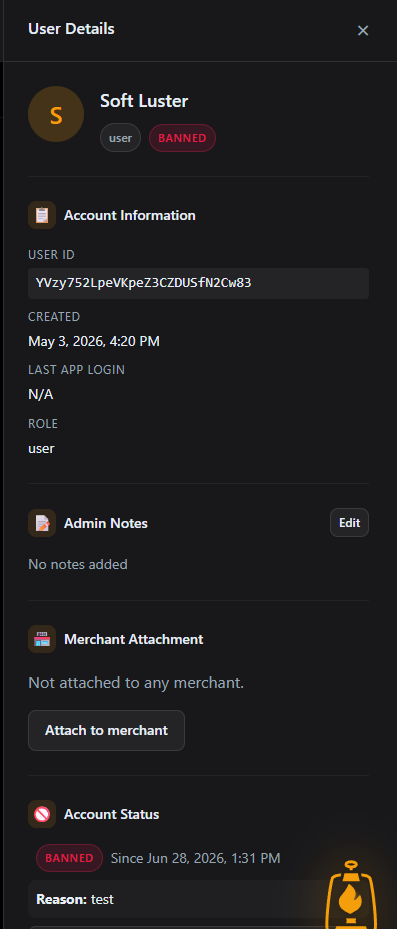
11. LIVE: Users-page Unban -> restores both axes
LIVE write. Reverses Scenario 10. Returns the throwaway account to a clean state.
- Goal: unbanning re-enables login and overturns the number ban so the account can register again.
- Preconditions: the user banned in Scenario 10.
- Steps:
- Open that user's detail panel (now showing Banned).
- Click Unban.
- Attempt to log in / re-register with that user's number.
- Expected: unban succeeds; login works again; re-registration is allowed again.
- Verify (data/console): Network:
POST /auth/moderation/unban-> 200. Auth tab: Disabled = false. Firestore:users/{uid}.banned: false,banRecordIdscleared; the priorbanned_accounts/{banId}now hasappealStatus: "overturned"and anexpiresAtin the past.adminActions:action: "unbanUser".
Result:    [ X ] pass   [ ] fail   [ ] blocked
Actual:    Seemed to have unbanned correctly and I was able to log in again ( account was Soft Luster / I believe it isn't a sealed account or was at least created before the sealed account integration )
Evidence:
Follow-up: